Connect your MikroTik (WireGuard)
One script, pasted once. Your router dials out to MyOLT; nothing is opened from the internet into your network.
Your values
Type your own addresses once — every command on these pages changes to them, ready to copy. Stays in this browser only.
Before you start
- RouterOS 7 (WireGuard is not in RouterOS 6). Check:
/system resource print. Upgrade with/system package update installif needed. - The MikroTik must reach the OLT:
/ping 192.168.88.10must answer. - Outgoing UDP 51820 to
our servermust not be blocked by your upstream.
Tell the panel your OLT network
Panel → Connect network → Your OLT network → e.g.
192.168.88.0/24→ Save.Copy your script
The same page shows a script made only for your account (with your private key). Press Copy. It looks like this:
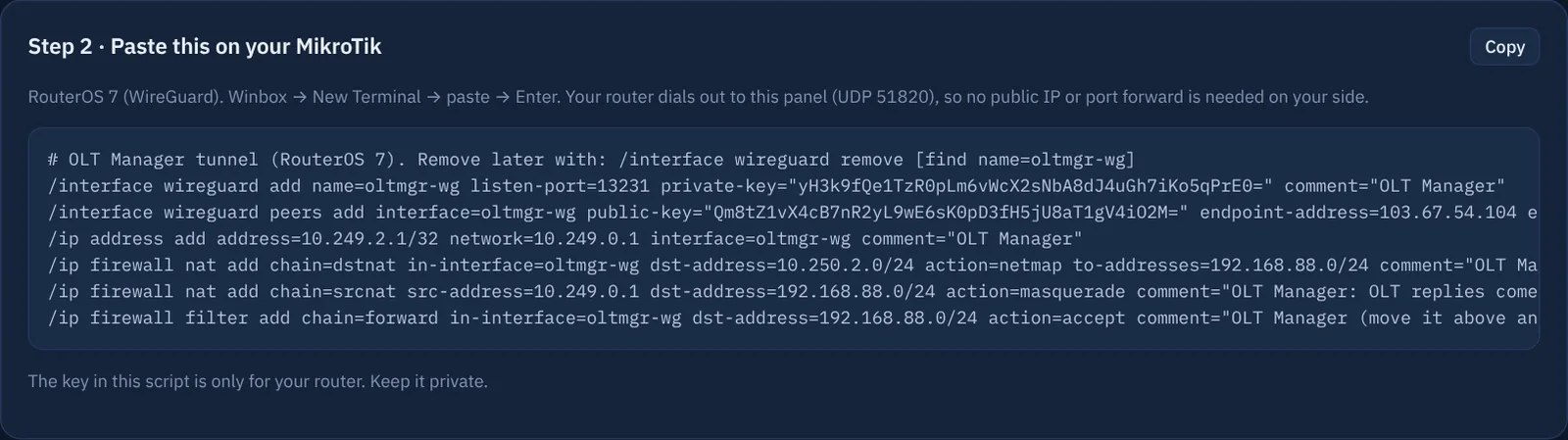
/interface wireguard add name=oltmgr-wg listen-port=13231 private-key="(your key)"
/interface wireguard peers add interface=oltmgr-wg public-key="(our key)" endpoint-address=(our server) \
    endpoint-port=51820 allowed-address=10.249.0.1/32 persistent-keepalive=25s
/ip address add address=10.249.N.1/32 network=10.249.0.1 interface=oltmgr-wg
# the panel's view of your OLT network -> your real OLT network, 1:1
/ip firewall nat add chain=dstnat in-interface=oltmgr-wg dst-address=10.250.N.0/24 action=netmap to-addresses=192.168.88.0/24
# replies from the OLT come back to the MikroTik
/ip firewall nat add chain=srcnat src-address=10.249.0.1 dst-address=192.168.88.0/24 action=masquerade
/ip firewall filter add chain=forward in-interface=oltmgr-wg dst-address=192.168.88.0/24 action=accept
Paste it
Winbox → New Terminal → right-click → Paste → Enter. No errors should appear.
Move the filter rule up (if you use firewall rules)
If your IP → Firewall → Filter Rules has drop rules in the forward chain, drag the rule "OLT Manager" above them.
See it connected
Within a minute the panel's Connect network page shows Connected — it checks by itself every 10 seconds, no need to refresh. On the MikroTik:
/interface wireguard peers printshows a recent last-handshake.Test
On the same page type your OLT's real IP → Test reach. Green = the panel can reach the OLT.
Troubleshooting
| What you see | Fix |
|---|---|
| Never connected | RouterOS 6 (use port forwarding)? Wrong paste (check /interface wireguard print)? UDP 51820 out blocked by your upstream or a firewall rule in output? |
| Connected, OLT does not answer | OLT network on the panel ≠ the one in the NAT rule; MikroTik cannot ping the OLT; the OLT's own access list blocks the MikroTik's IP (see your OLT's guide). |
| Was working, now "not connected" | Router rebooted without internet, or the WireGuard interface was disabled. The tunnel comes back by itself once the internet is up. |
| Remove MyOLT | /interface wireguard remove [find name=oltmgr-wg] and remove the rules with comment "OLT Manager". |
No RouterOS 7? Use port forwarding. Any other router with WireGuard (OPNsense, pfSense, Linux) also works — ask us for the settings.